Branch Settings
Branch > Settings
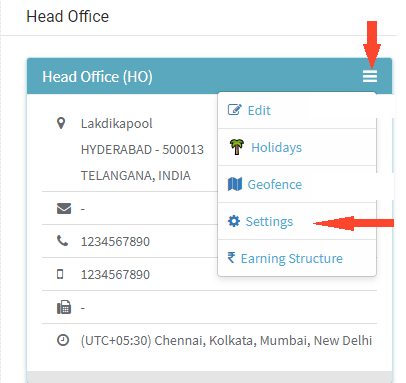
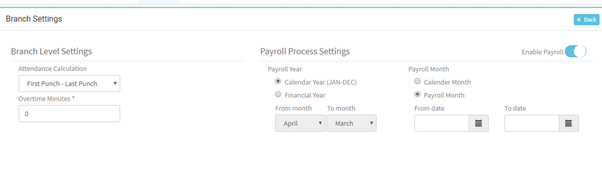
- We have Branch Level Settings and Payroll Process Settings
- Branch Level settings deals with Attendance Calculation
- Attendance Calculation has options First Punch – Last Punch and All valid Punches
- If First Punch – Last Punch is selected it takes only the first and last punches of the day and calculates Attendance
- If ‘All Valid Punches’ is selected then all In Punch should have an Out Punch also, else it is taken as absent
- Overtime Minutes – these are the minutes to be defined after how many minutes the employee should display in Overtime graph on Dashboard.
- Payroll Process Settings
- Payroll Year – defines the financial year for the Organization
- Select required Payroll Year; if Financial Year is selected can change the From Month and To Month
- Payroll Month – defines how the payroll must be processed
- If Calendar month is selected the payroll Process will take the attendance for a month
- If Payroll Month is selected, then select the dates
- Enable Payroll – If option is switched on then Payroll will be processed for the branch.
- You can disable Payroll if not required in future.